

To find the latest date in a list, use =MAX(A2:A20). Dates are stored as numbers, so MAX works on them exactly as it does on any other number. The one thing that trips people up is the result appearing as a serial number like 45240 — that’s the cell format, not the formula, so press Ctrl+1 and set it to Date.
For the earliest date, use =MIN(A2:A20), and for the second-latest, =LARGE(A2:A20,2). To find the latest date meeting a condition, use MAXIFS: =MAXIFS(B2:B20,A2:A20,"North") gives the most recent date for the North region, and you can bound it by a date range with =MAXIFS(B2:B20,B2:B20,">="&DATE(2026,2,1),B2:B20,"<="&DATE(2026,3,31)).
Build the criteria dates with DATE rather than typing them as text, since a text date depends on regional settings. MAXIFS needs Excel 2019 or later; on older versions use =MAX(IF(A2:A20="North",B2:B20)) entered with Ctrl+Shift+Enter.
Both MAX and MAXIFS ignore dates stored as text, so a left-aligned date won’t be considered at all.
In Excel, you can use a simple formula if you have a list of dates and want to get the date that is the max out of all those. For this, all you need to do is to use the MAX function, and if you want to get the max date using a condition then you need to use the MAXIFS.
This tutorial will help you to understand both of the functions to get the max date.

Formula to Get the Max Date
- First, in a cell, enter MAX function.
- Now, enter the closing parentheses to start the function.
- Next, refer to the range where you have the list of dates.
- In the end, enter the closing parentheses and the hit enter to get the result.
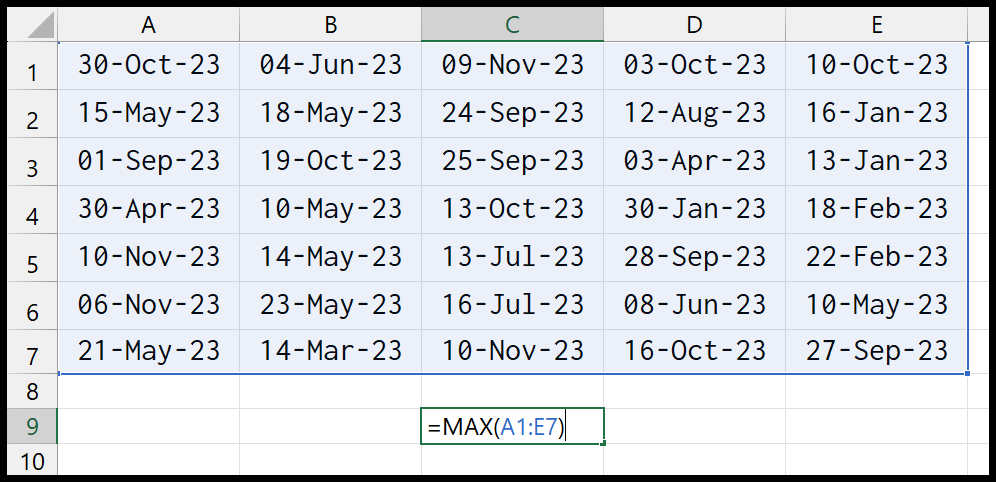
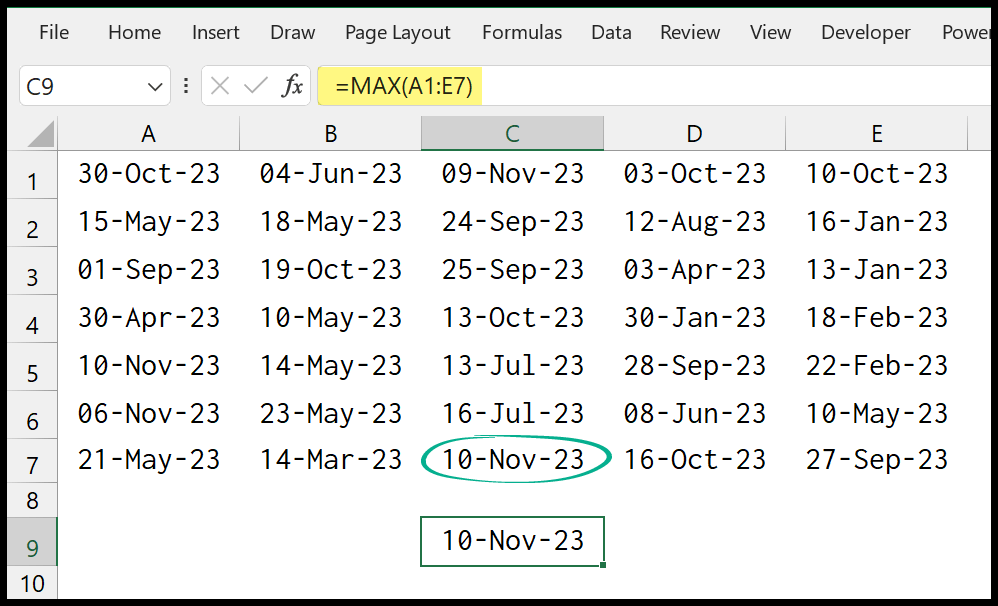
Once you hit enter it returns the max date from the data. And in our example, 10-Nov-2023 is the max date.
Get the Max Condition with a Condition
Now if you want to get the max date from the same data but by using a condition, you need to use the MAXIFS function.
=MAXIFS(A1:E7,A1:E7,">"&DATE(2023,2,1),A1:E7,"<"&DATE(2023,3,31))In the above formula, we have specified a condition to get the maximum date between 01-Feb-2023 and 31-Mar-2023. And it returns 14-Mar-23 in the result.
To understand this, you must know the MAXIFS function and its arguments.
- max_range
- criteria_range1
- criteria1
- criteria_range2
- criteria2
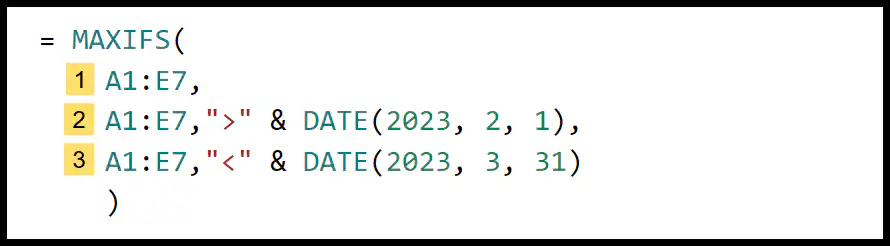
- First, specify the max_range from where you want to get the max date.
- After that, in the criteria_range1, you need to specify the same range again where you have the dates. In criteria1, you need to specify the range for the lowest date for the date range along with the lower than operator.
- Next, in the criteria_range2, you need to specify the same date range again. In the criteria2, you need to specify the highest date and the greater than operator.
- In the end, close the function and hit enter to get the result.
Note: We have used the DATE function to specify the date in the criteria.
Written by
Puneet Gogia
Microsoft MVP — Excel · Founder, Excel Champs
Twelve years of teaching Excel, and a decade before that using it as a data analyst. Every tutorial here is written from a file I actually built.